
I never heard of “Punchbowl” until last August when I received a notification to my G-Mail account that my cousin had a special event. So why did I think this was a scam?
The Message
As always, I start with the message. I must admit that at first glance it is a good one.

- For openers, it chose a sender I would normally trust.
- Second, the predominance of the graphic distracts you from the details described later. This particularly matters on smartphones where the entire screen will be consumed.
- Third, it is an event that few of us experience. Getting an invitation from a friend for an event is not a routine message. All I have to do is click on “Open invitation.”
But that is the first mistake. Why not capitalize “invitation?”
Then there is the footer of the message. If you are using a smartphone, it is doubtful you will scroll down to the bottom of the message. Desktop users may see what is listed below.
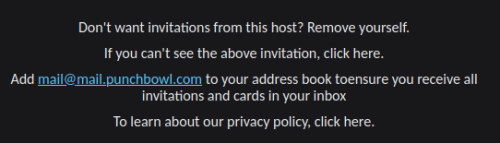
At this point, it is obvious the scammer is rather lazy. “Remove yourself” has no link. “click here” has no link. And who on the this planet has an e-mail address of mail@mail…..?” Then there is the grammatical error “toensure,” followed by another missive “click here” with no link.
It is obvious that the scammer figured that you would simply click “Open invitation” without looking at the details below.
The Email Address
I utilize multiple e-mail addresses based on the type of messages it is expected to receive. I get into more detail about this approach in E-mail: A Method to the Madness.

This particular e-mail address was Google’s G-Mail. In my universe, I typically use G-Mail for situations where a website is reluctant to accept a non-conventional domain. Another use of G-Mail addresses are with applications that intuitively operate using your Google account (something frequently encountered on smartphones).
My cousin has a G-Mail account, so receiving a message with “From” marked with her address was not unexpected. But directing the message to my Google e-mail account? That was unusual because I normally correspond with my cousin using an address reserved for friends and family.
So use of this Google e-mail address, under this situation, was a red flag.
The Links
One of the advantages of using your desktop computer to view messages is that you can hover your mouse pointer over a link and see where it is going to take you. It usually appears in the lower left corner of the message.
There is only one link in this message. “Open invitation” will take you to the following URL:
https://improveanalysis-crea.icu/betserun/burths
As is immediately apparent, it is not going to direct you to Punchbowl.
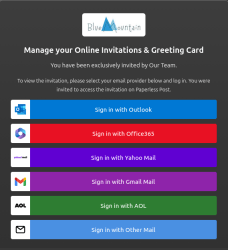
I was able to preview the content. As you can see, it borrows Blue Mountain’s logo. What follows below is classic phishing. The objective is simple – capture your ID and password to whichever e-mail service you utilize.
This came in my G-Mail account. So, presumably, their objective was to capture my Google account ID and password.
Who is improveanalysis-crea.jcu?
Let’s begin our journey with WHOIS to discover exactly who registers this domain?
The domain was registered recently, from Mahe, Seychelles Islands. The guy even has his name and address in the registry. Yet when I check Google Maps, there is nothing that matches Anse Etoile Road.
So the first red flag is the recent registration. The second red flag may be a mysterious address for the registration.
What about the IP Address
IP addresses are sometimes helpful. The nslookup command can be used to correlate the domain with a recently associated IP address.
$ nslookup improveanalysis-crea.icu
Server: 127.0.0.53
Address: 127.0.0.53#53Non-authoritative answer:
Name: improveanalysis-crea.icu
Address: 172.67.223.106
Name: improveanalysis-crea.icu
Address: 104.21.54.40
Name: improveanalysis-crea.icu
Address: 2606:4700:3036::6815:3628
Name: improveanalysis-crea.icu
Address: 2606:4700:3035::ac43:df6a
Using AbuseIPDB, I can gather details about who administers the IP address and whether there is any history of abuse. Both IP addresses report zero abuse activity and both are operated through Cloudfare. Cloudfare is a very frequently used platform for Internet services and they have a means for reporting abuse.
What we learn from this is the scammers are using a commonly used web platform provided by Cloudfare.
What Happens When you Click any of the Links?
They all point to the same thing, launching a script which presents the query below.

As you can see, the scammers are attempting to confuse the reader. Remember, this is an unusual event for the reader. How often do you get an invitation? Do I really need to enter my email password to respond to an invitation?
Header Analysis

If you are not a techy, you might not care to read this section.
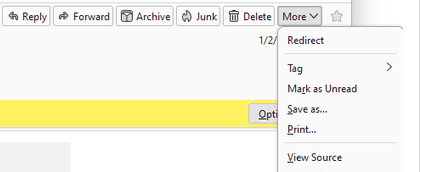
I utilize Thunderbird as my e-mail software. Within their messages is a menu item titled “More” under which I can select “View Source.” This presents the entire e-mail, most particularly the routing information. So what does the e-mail header reveal?
Delivered-To: myemail@gmail.com
Received: by 2002:a05:6400:62ad:b0:2dc:8c4a:10 with SMTP id kv45csp4214425ecb;
        Mon, 24 Aug 2026 05:00:23 -0700 (PDT)
X-Forwarded-Encrypted: i=3; AHgh+RqCf7T5ut8pNzwpPHuGWPUalOUZfGzNXAK0gdHtXelUUBjRVtbUR+wb3FAwRuwMyaHZoHu6w6tIPg==@gmail.com
X-Received: by 2002:a05:6a00:c488:b0:852:131f:b9d2 with SMTP id d2e1a72fcca58-852131fbcccmr20447004b3a.2.1787572822528;
        Mon, 24 Aug 2026 05:00:22 -0700 (PDT)
ARC-Seal: i=2; a=rsa-sha256; t=1787572822; cv=pass;
        d=google.com; s=arc-20260327;
        ….
ARC-Message-Signature: i=2; a=rsa-sha256; c=relaxed/relaxed; d=google.com; s=arc-20260327;
        h=to:subject:message-id:date:from:reply-to:mime-version
         :dkim-signature;
        …..
        dara=google.com
ARC-Authentication-Results: i=2; mx.google.com;
       dkim=pass header.i=@gmail.com header.s=20251104 header.b=Cso22faU;
       arc=pass (i=1);
       spf=pass (google.com: domain of spoofedemail@gmail.com designates 209.85.220.41 as permitted sender) smtp.mailfrom=spoofedemail@gmail.com;
       dmarc=pass (p=NONE sp=QUARANTINE dis=NONE) header.from=gmail.com;
       dara=pass header.i=@gmail.com
Return-Path: <spoofedemail@gmail.com>
Received: from mail-sor-f41.google.com (mail-sor-f41.google.com. [209.85.220.41])
        by mx.google.com with SMTPS id d2e1a72fcca58-8520ff44a83sor4226082b3a.0.2026.08.24.05.00.22
        for <myemail@gmail.com>
        (Google Transport Security);
        Mon, 24 Aug 2026 05:00:22 -0700 (PDT)
Received-SPF: pass (google.com: domain of spoofedemail@gmail.com designates 209.85.220.41 as permitted sender) client-ip=209.85.220.41;
Authentication-Results: mx.google.com;
       dkim=pass header.i=@gmail.com header.s=20251104 header.b=Cso22faU;
       arc=pass (i=1);
       spf=pass (google.com: domain of spoofedemail@gmail.com designates 209.85.220.41 as permitted sender) smtp.mailfrom=spoofedemail@gmail.com;
       dmarc=pass (p=NONE sp=QUARANTINE dis=NONE) header.from=gmail.com;
       dara=pass header.i=@gmail.com
ARC-Seal: i=1; a=rsa-sha256; t=1787572822; cv=none;
        d=google.com; s=arc-20260327;
        ….
ARC-Message-Signature: i=1; a=rsa-sha256; c=relaxed/relaxed; d=google.com; s=arc-20260327;
        h=to:subject:message-id:date:from:reply-to:mime-version
         :dkim-signature;
        …..
        dara=google.com
ARC-Authentication-Results: i=1; mx.google.com; arc=none
DKIM-Signature: v=1; a=rsa-sha256; c=relaxed/relaxed;
        d=gmail.com; s=20251104; t=1787572822; x=1788177622; dara=google.com;
        h=content-type:to:subject:message-id:date:from:reply-to:mime-version
         :from:to:cc:subject:date:message-id:reply-to:content-type;
        ….
X-Google-DKIM-Signature: v=1; a=rsa-sha256; c=relaxed/relaxed;
        d=1e100.net; s=20251104; t=1787572822; x=1788177622;
        h=content-type:to:subject:message-id:date:from:reply-to:mime-version
         :x-gm-gg:x-gm-message-state:from:to:cc:subject:date:message-id
         :reply-to:content-type;
…...
X-Forwarded-Encrypted: i=1; AHgh+Ro0rV7UyX0aHCtHhWLzXrt9sDTk3Ew9R1rqxnXiYyIlps2oOl7pRPTBgal3wgXYL1LxR0fSt5e3Rw==@gmail.com
….
X-Received: by 2002:aa7:88d5:0:b0:84f:3f5e:f072 with SMTP id
 d2e1a72fcca58-8520be6fd83mr28452691b3a.10.1787572821191; Mon, 24 Aug 2026
 05:00:21 -0700 (PDT)
MIME-Version: 1.0
Reply-To: spoofedemail@gmail.com
From: spoofedemail@gmail.com>
Date: Mon, 24 Aug 2026 08:00:00 -0400
X-Gm-Features: AcwNN1Ujo6wmUBV5-LpwbCm-Mzu9MSYlYFwDk2qMriHX4TWodLvigCzBKv0sZgI
Message-ID: <CA+EfM4n8xWJUgrRVC3R4Wbdt1tebc-x+TYz_EWnLB3qWKtwD_A@mail.gmail.com>
Subject: YOU ARE INVITED PLEASE RSVP
To: undisclosed-recipients:;
Content-Type: multipart/alternative; boundary="000000000000046f9e0659c9bb62"
Bcc: myemail@gmail.co
I have to admit that this one has me a bit bewildered. If there is anything true about my spam journal it is that every article implies something new is learned. This is the first time I have encountered the ARC authentication protocol. The Authenticated Receive Chain, introduced in 2019 as an experimental protocol, has since been considered in question. It attempts to incorporate three other authentication standards (STF, DKIM and DMARC) which are used to authenticate mail services and servers. ARC has been used by bulk mail services. So, for this instance, it appears the scammer has gone to a great deal of trouble to either misuse an existing bulk mail service or generate a rogue bulk mail service with an apparent registered authentication key.
The originating IPv6 address is considered a “private” address and is not convertible to IPv4. The address is 2002:aa7:88d5:0:b0:84f:3f5e:f072.
The message was directly fed into the Google email universe. Thus, it sort of self-congratulated itself as the message traveled from the source to my address at Google. So even with an aggressive spam filter engaged, this message would have likely ended up in my Inbox.
Is the Punchbowl Scam a Trend?
Yes. A search of “Punchbowl Spam” or “fraud” produces several results. One useful site is Malware Tips, where you can see I am not the only one who reports things like this.
Scoring this Scam
It has been my experience that spam filters are still a bit off the mark. Too many scams still get through. For this reason, I will continually beat this drum – email software designers need to incorporate scoring to help the reader determine on their own whether a message is a scam or not.
- URL used in the message has been recently registered
- URL and Reply-To or Source email stream is inconsistent
- Otherwise, this message would have scored high because it was ARC approved and was confirmed authenticated by Google.
- In essence, scoring would not be helpful, possibly providing a false impression of a risk-free message.
- Possibly in the future, AI components in our e-mail software may enable a review of the message itself, identifying many of the concerns listed above.
What You can Do About it?
- Use multiple e-mail addresses based on the type of traffic you would expect
- Before clicking, hover over buttons to see if the corresponding URL matches the actual company it claims to be.
- Read the whole message. Note missing links, misspelled words and other missives.
- If you can get an IP address of the abuser, AbuseIPDB has a rather efficient reporting process which can quickly be completed.
- Cloudfare, however, has a rather extensive form to fill out. In fact, it is about as extensive as the completion of this article. 🙂 Unfortunately, their reporting page fails when you click “Submit,” presenting a 403 error (which means “Missing Page.”). Maybe it gets through.
- If you get fooled and type in your password, change your password immediately. And get smart about passwords. See Passwords – The Gremlins of Cyberspace.
- If the scam is directed to your G-Mail account, go directly to your G-Mail account and report the message as Phishing.
Resources
- Passwords – The Gremlins of Cyberspace
- Email: A Method to the Madness
- WHOIS
- AbuseIPDB
- Cloudfare Report Abuse
- The Real Punchbowl
- “What Is ARC (Authenticated Received Chain) in Email?”, Validity, by Sandra Schubert, April 12, 2022.
- DNS Checker
© Copyright 2026 to Eric Niewoehner